New in the innovaphone App Store: Snom Hospitality by Snom
Snom Hospitality – Easily Configure and Manage Snom Hospitality Phones
Snom Hospitality enables the convenient setup and administration of Snom Hospitality phones. With this application, administrators can quickly and easily configure and manage Snom phones. The app is suitable for both individual phones and large-scale installations in hotels and the entire hospitality sector.
A dedicated configuration section is available for each supported phone model. This section provides access to the features and settings available for the respective device. This allows phones to be deployed efficiently and reduces the configuration effort required for administration.
Please note: The interface of the app is available exclusively in English language.
New in the innovaphone App Store: Call Manager by MediaRunway
Managing client calls, tracking call notes and organizing follow-ups can quickly overwhelm daily business operations. This often leads to teams wondering who discussed which issues.
To solve this challenge, MediaRunway launched the Call Manager. This new application integrates seamlessly into the innovaphone myApps ecosystem. The app centralizes call histories, notes, callbacks and favorites to deliver maximum clarity in daily call management.
Call Data Exactly Where Needed
The Call Manager enhances your experience with the Phone App by delivering practical contextual data. Teams can capture call notes, retrieve existing information and view pending callbacks directly within the active call screen.
The need to search through multiple systems for critical details is eliminated. When speaking with a client, partner or colleague, users instantly see previous conversations, open callbacks and upcoming action items.
Advanced Search and Filtering for Call Histories
Call Manager brings clear structure to daily communication logs. Users can view, comment on and process call entries directly, such as converting a call log into a scheduled callback.
When combined with the Analytics App, teams unlock advanced capabilities to search, filter, sort and restrict data by specific timeframes. This significantly simplifies tracking and reporting for high-volume communication teams.
Effortless Callback Management
Pending callbacks can be managed from a central dashboard within the Call Manager. Users can create, filter, sort and forward callbacks for individual PBX users or entire user groups. Multiple callback statuses with live updates ensure full visibility.
The built-in action history tracks every update made to a callback. This provides full transparency within the team and ensures no client request is overlooked.
Flexibly Organize Favorites
In addition to call logs and callbacks, the Call Manager offers advanced options for favorite lists. Users can organize contacts into custom groups without the traditional 30-contact limitation.
Teams can search for PBX users directly, add custom destinations and use full support for federation scenarios. Integrated actions allow users to call or message contacts straight from the list.
Bottom Line: Maximum Efficiency for Call Management
Call Manager by MediaRunway is designed for environments where telephony drives daily business, including sales, service, support and reception desks. By bringing information, notes, callbacks and contacts directly into the conversational context, the app empowers teams to work faster and more structured.
The web server can now be started with an option that fully disables unencrypted HTTP access via port 80. Access can then be strictly limited to TLS-encrypted HTTPS connections, providing more restrictive security for the App Platform. The corresponding parameter is transmitted to the web server when the App Platform Manager is launched.
DECT devices can now be configured directly in UsersAdmin. They can further be imported via XML or CSV. This simplifies the management of these devices and reduces manual workload, especially for larger installations.
Projects App: New Functions for Your Personal Home Screen
The Projects App introduces new features to make the home screen more organized. Users can customize their home screen, reorder lists using drag-and-drop, and display exactly the items that are important for their daily work.
Also new are lists for pinned tasks and pinned backlog items, as well as private notes. These notes can be created and managed directly on the home screen. If needed, they can then be converted into project items such as projects, sprints, tasks or backlog items.
The G.729AB codec is once again available in myApps and on IP phones. This increases flexibility in existing installations and supports scenarios where low bandwidth, compatibility or specific endpoint requirements are a factor.
The Translations App now supports integration with eTranslation, the European Commission’s AI translation service, as well as the use of a company’s own, locally hosted LLM. Companies and organizations gain greater flexibility in deciding how to handle translations, whether through a European translation service or through their own language models running on local infrastructure.
Users Service: Automatically Assigning Configuration Templates and Home Screens
If users are imported from Active Directory via the LDAP replicator without an assigned configuration template, the default configuration template from Users Admin is automatically applied. The same applies to the home screen assignment. This reduces manual administrative effort and ensures that new users immediately start with a default configuration.
Follow-Me: Activating and Managing Follow-Me via DTMF Codes
The Follow-Me feature can now be activated and managed directly on the desk phone using DTMF codes. This simplifies operation, particularly at standard workstations, in shared spaces, or wherever quick adjustments are needed without using a web interface.
myApps Client: Sending Feedback via the Hamburger Menu
A feedback page is now accessible via the hamburger menu of the myApps client. Users can submit feedback on myApps directly through the linked innovaphone website. This simplifies communication and establishes a direct channel for feature requests, bug reports and general improvements.
Microsoft 365 Connector: Flexibly Assigning the “Free” Calendar Status
In the Microsoft 365 Connector, calendar entries marked as "Free" can now be assigned to any specific presence status. This offers greater flexibility for presence synchronization and gives organizations better control over how calendar availability appears in myApps.
Translations App: More Choice for Secure Translations
Successful communication across language barriers requires both fast translations and a secure processing environment.
Government agencies, public institutions, critical infrastructure providers, the healthcare sector and international teams rely heavily on these factors. For these organizations, data protection, control and digital sovereignty are essential.
The innovaphone Translations App offers even greater flexibility with Service Release V16 SR3 by supporting integration with eTranslation, the AI translation service of the European Commission, and allowing the use of a company’s own, locally hosted LLM.
eTranslation: European Translation Services for Sensitive Communication
By connecting the Translations App to eTranslation, organizations have access to an official AI translation service provided by the European Commission. This solution is ideal for organizations that:
Work across European borders
Manage multilingual communication
Prefer European digital solutions
Developed specifically for multilingual communication across Europe, eTranslation supports numerous European languages. The service is available free of charge for public administrations and other eligible user groups within the EU.
These features make eTranslation ideal for translating content regularly between different European languages. Typical use cases include international projects, collaboration with public authorities, as well as communication with partners, customers and institutions from other countries.
In-House LLMs: Translations Within Your Own Infrastructure
In addition to eTranslation, the Translations App can connect directly to your company’s own, locally hosted LLM (from V16r1 SR3).
This solution is ideal for organizations that prefer to process all translations within their own secure network. Instead of relying on an external translation service, companies can run an internal language model. This approach is perfect for highly sensitive data or specific internal requirements.
Did You Know?
In addition to eTranslation, the European Commission provides various other AI-powered language tools. These include solutions for:
Creating summaries and optimizing text
Simplifying language for accessibility
Anonymizing data
Converting speech to text
Using the innovaphone Software Development Kit (SDK) and the APIs provided by the EU, such services can also be integrated into the innovaphone environment. This opens up opportunities beyond simple translation to securely and effectively integrate AI-based voice features into existing workflows.
Benefiting from Smarter, More Flexible Translations
The updated Translations App offers organizations greater flexibility in how they handle translations within myApps. Companies can choose between using a European service like eTranslation, running an internal, locally hosted LLM, or connecting to additional language services in the future.
This represents a major milestone for government agencies, public institutions, critical infrastructure providers, and other organizations with strict communication requirements. It simplifies multilingual collaboration while aligning perfectly with internal data protection and infrastructure policies.
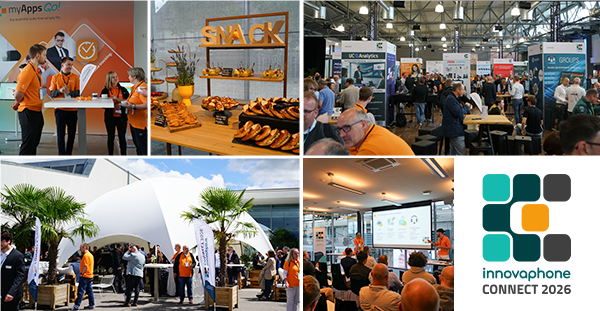
On June 11, 2026, the Legendenhalle at Motorworld Böblingen once again became a vibrant hub for modern communication and digital collaboration. The innovative CONNECT 2026 once more exceeded our expectations.
Nearly 1,000 registrations, 45 national and international app partners and technology partners, numerous presentations, workshops and live demos - but above all, many encounters, innovative ideas, and memorable conversations made this day an unforgettable experience.
Guided by this year’s motto, “Connecting People. Creating Productivity.” we focused on advanced technologies to connect people, teams and processes. The ever-growing myApps ecosystem took center stage, and visitors were able to experience it firsthand and try it out for themselves at the exhibition booths.
From AI to Crisis-Proof Communication
The CONNECT 2026 program was as versatile as the demands of modern work environments. Topics ranged from artificial intelligence and the new myApps Assistant to modern contact center solutions, crisis management, the Internet of Things (IoT), and communication systems for the maritime market.
Live demos, interactive workshops and key notes provided valuable insight to new technologies. We had a hands-on approach, with use cases, questions and lively discussions.
Were you unable to listen to all the presentations or were you unable attend the event? The recordings are now available for you to watch.
As impressive as the data, technology and new features may be, CONNECT truly thrives because of the people who bring it to life. We are incredibly grateful to our exhibitors and speakers for sharing their knowledge and ideas. Thank you to our visitors, who asked insightful questions, engaged in vibrant discussions, and provided such valuable feedback. A big thank you also goes to our colleagues who began planning long before doors opened, ensuring a seamless experience on-site.
After a high-energy day packed with new insights, CONNECT shifted into celebration mode at the evening get-together. Over great food and refreshing drinks, conversations continued, ideas flowed, and partners laughed, danced and simply enjoyed the great company.
The special energy of the day is best experienced by watching our recap video:
A big thank you to all our guests, exhibitors, speakers, and colleagues who made CONNECT 2026 truly special with their ideas, dedication, and enthusiasm.
We look forward to meeting you at the next CONNECT!
2026-06-17 | Newsticker
New in the innovaphone App Store: TIMIO by Caseris
TIMIO. Contact Center expands innovaphone myApps with a comprehensive omnichannel solution for professional service communication. Service inquiries via phone, email, and web chat are intelligently routed and managed in a structured manner throughout the entire handling process: from capture and routing to CRM integration, context-based processing, and transparent analysis.The result is a contact center that goes far beyond traditional queues, ACD logic, or simple call distribution. 100% software made in Germany, integratable, scalable, and AI-ready.The app requires a TIMIO. Contact Center (cloud-based or on-premises).
New in the innovaphone App Store: MobiCall by NewVoice
MobiApp Demo – Discover the mobile solution for alerting, location tracking, and communication. MobiApp brings alerting and communication directly to mobile devices, enabling fast and clear responses - even for lone workers and in critical situations.The MobiApp Demo is available in the innovaphone myApps portal and provides an overview of the features and possibilities of the MobiCall alarming solution “MobiApp”, powered by NewVoice International. After opening the app, users are presented with a welcome message and a start screen explaining that they can navigate through the app by swiping left or right
With the release of V16, Unified Communications and Collaboration gets ready for the next chapter. Numerous improvements and innovations covering telephony features, conferencing, collaboration, business apps, hardware, and infrastructure boost efficiency, reliability, and user-friendliness - all seamlessly integrated into one single UCC platform.
New in the innovaphone App Store: File Transfer by MediaRunway
"Could you please resend the file? It was too large to send via e-mail…"
Does this sound familiar to you? Files are increasing in size: Presentations, videos and the documentation of projects quickly exceed the size limits of standard e-mails. The result: workarounds, external tools, or insecure solutions.
File Transfer by MediaRunway lets you share files that are too large for emails:
Share Files without Detours Use the app to transfer large files directly through your own system - without any external platforms or additional tools. You remain in full control over where your data is stored and who is able to access it.
Security that Thinks Ahead Every file can be encrypted, password-protected, and made available only for a limited time. This ensures that sensitive content can be accessed only by the authorized persons and only for as long as necessary.
Full Control Instead of Shadow IT Whether in a project team, when communicating with customers or when handling sensitive documents: Instead of using insecure cloud services, use an integrated solution within your myApps environment – transparent and in compliance with GDPR.
Typical Scenario:
A customer would like you to send a comprehensive presentation with multiple files. Instead of splitting it up or sending the files via external services, you can create a secure download link with a password and expiration date. This allows you to hare files quickly and securely, directly from your system.
Available Now: V16 Beta 6 - Test the Latest Features!
Beta 6 for V16 is available now! Don’t miss the opportunity to test the latest functions exclusively before everyone else. Some highlights awaiting you are the Conference Scaler for scalable conference resources, the Connector for WhatsApp, the new document storage feature in the Connect App and incremental LDAP replication for more efficient processes in large installations.
What to Expect with Beta 6:
App IP:
App IP brings full PBX functionality to the innovaphone App Platform as an app service. Central communication functions are provided flexibly as an application and can be seamlessly integrated into modern IT environments. The solution runs on the Docker Container App Platform, for example, and combines the App Platform and PBX in a single system (container). This creates a compact and comprehensive solution that enables easy deployment, high scalability, and maximum flexibility for operating modern communication solutions.
App Platform Update – Security and Stability Improvements:
Kernel updated to version 6.12.74 (stability/security)
OpenSSL updated to version 3.6.1 (security)
Buildroot updated to version 2025.11 (new package versions)
PostgreSQL query planner optimized for SSDs/NVMEs
Added kernel tool “perf” (useful for app developers)
Conference Scaler:
The Conference Scaler is an app service that allows multiple conference interfaces to be operated in a cluster, enabling horizontal scaling of the infrastructure. The conference interface cluster can be flexibly reduced and expanded in size, and can be used in parallel by many small and large conferences without the need for explicit assignment of individual conference interfaces to specific conference objects. Interconnection in the cluster generates technical overhead, so that a conference interface in the cluster supports approximately 66% of the participants in standalone operation.
Connector for WhatsApp:
The innovaphone Connector for WhatsApp enables the use of the WhatsApp Business API in the innovaphone Connect App. Once the connector has been set up, incoming messages sent to the company’s WhatsApp numbers are automatically displayed in the desired channel within the Connect App, where the messages can be answered directly. The company can quickly be contacted by customers, offers fast services and creates a modern communication experience. With multiple WhatsApp numbers, inquiries on various topics are also posted within the appropriate channels and the responsible employees are immediately informed.
Documents:
Documents enables easy file sharing directly in Connect. Files can be uploaded using a button or drag-and-drop, and shared with other myApps users via a Connect message. Uploaded files can be edited by users and are updated automatically. Documents thus supports structured and transparent collaboration.
Incremental LDAP Replication:
Optimization of LDAP replication between PBXs through incremental replication
Write operations possible on all replication participants
MQTT Broker:
The innovaphone MQTT broker opens up a new area of communication, namely the world of IoT. With this, innovaphone provides a service that enables the seamless integration of MQTT-enabled devices into the innovaphone environment. The broker handles message processing between MQTT clients and offers a clear management interface. Features such as access list control and the connection of third-party brokers are supported. The client library can be used to develop apps with the MQTT protocol.
Projects:
The Projects App is now more organized and more secure: Sections can now be deleted and easily restored via a restore menu, if needed. After 100 days, deleted items are automatically and permanently removed. Only admins can delete areas, while other items can still be deleted by all users. Users can only see their own deleted items, while admins can see all relevant items. Also available: An onboarding tour that quickly explains the Projects App to new users. The onboarding tour is a great way to get started with Projects.
Working:
The latest version of the Working App links leave requests directly to the Connect App. When a request is submitted, a private Connect discussion is automatically created, involving the applicant, department manager, and HR. The messages remain visible only to these participants. Status changes such as “Approved” or “Rejected” as well as queries and approvals appear directly as responses in the same thread, and everything is clearly documented. The groups involved (e.g., HR) can be flexibly defined on the setup page and expanded at any time.
Your Feedback - A Valuable Contribution:
Please visit our innovaphone Community for more details on new features in the Beta phases, and to get in touch with other community members.
We look forward to your feedback!
This website uses cookies to provide you with an optimal website experience. This includes cookies that are necessary for the operation of the website, as well as cookies that are only used for anonymous statistical purposes or for convenience settings to display special content. You can decide for yourself which settings you would like to allow. Please note that not all functionalities of the website might be available, depending on your settings. If you accept all cookies, you will have full access to all the services of our website. For further information, please read our privacy policy.