The 5th Beta phase of V16 has just been released! Get ready for exciting new features and improvements to enhance your user experience. Take a look at the latest developments and share your feedback with us!
What to Expect with Beta 5:
Conference Transcriptions:
The solution records a conference call, transcribes what is said and organizes the content to conveniently structure results and tasks in meeting minutes. All functions are directly accessible via the participant list of the Softphone App – from starting the transcription to creating the finished meeting post, which can be edited and posted directly in the Connect App. (You can freely choose which AI models to use.)
innovaphone IP270 - The myApps Phone:
The large 7-inch touch display combines telephony functions and apps directly on one device. Operating the phone is intuitive and user-friendly, without requiring an extra computer. The IP270 is ideal for everyone who still wants to use a conventional telephone, but with all functions of the myApps platform.
Ideal for Versatile Business Settings:
Video calls
Video conferences & virtual meetings
Switchboard
All apps are accessible on the display
Selected partners can now test the myApps phone IP270 at a 16r1 PBX.
Reconnect Calls for Seamless Handover & Roaming:
Phone calls remain connected without interruption when network conditions change. Calls remain active without requiring any intervention - when switching within the same network as well as switching between Wi-Fi, 5G or Ethernet, during PBX reboots or during brief service outage, for example while driving. This is of great advantage for mobile employees and commuters.
Screen Reader Support for Accessible Telephony: The Softphone 5 provides comprehensive screen reader support for our phone apps (Phone App, Softphone App, RCC App). The objective is to enable users with visual impairments to access our telephony solutions without restrictions - with clear screen reader output and full keyboard operability.
New Functions in the Switchboard App:
E-mail notification for callback requests during an active call: A callback request via e-mail can now be created during an active call. The e-mail contains pre-stored information on the call such as name, phone number and e-mail address of the caller (if available).
Improved search function with the Phone App / Softphone App: The search function has been optimized, and now corresponds to the search function of the Phone App & Softphone App.
More detailed display of search functions and BLF entries: Search results are now displayed with more detailed information. Details in the BLF entry have been expanded for you to find relevant information faster.
ECDSA Certificates: We are preparing our products for future security requirements with broad support for ECDSA certificates. Compared to RSA, ECDSA offers significantly shorter key lengths at higher security levels while simultaneously ensuring high encryption strength and efficient performance.
Your Feedback - A Valuable Contribution:
Please visit our innovaphone Community for more details on new features in the Beta phases, and to get in touch with other community members. Stay up to date with the hashtags #16r1#Beta We look forward to your feedback!
2025-12-19 | Newsticker
V16r1 – Beta 4 is ready to test!
Just in time for the end of the year, we have a little pre-Christmas gift for you: Beta 4 of V16r1 is now available and ready for testing!
You can look forward to new features, targeted optimizations, and important enhancements across various areas. Discover the latest updates and become a beta tester!
Highlights of Beta 4:
New Features in Working:
Working User: Push notifications for changes in the processing status of absence requests (vacation, sick leave) and absences, such as overtime compensation, are now also available without time tracking.
Working Manager: Push notifications for new absence requests, badge count for open absence requests, setting up absences without time tracking (e.g., overtime compensation), display of users’ presence status, “Chat” button in the user overview, and various other minor improvements.
Updates in the Quotations Calculator:
Template function for projects without requests or templates: The "Template" function can now be used for calculations or templates, enabling preparation and reuse of a calculation.
Project search and filtering: A search function has been implemented in the project area.
Translations and item notes: Additional information for individual items has been added in the item search and wizard.
Set project status: After submitting a request and assigning conditions, the status "Won" or "Lost" can now be set via a selection menu.
RTT support for emergency calls: According to EU Directive 2019/882, emergency services must ensure accessible and equal access for all users. Our gateways are suitable for setting up such emergency call centers, as they now support Real-Time Text (RTT) and the transmission of location information. This allows emergency calls to be forwarded in real time via voice and text directly to NGX-compatible control centers.
Updates in the Switchboard App: Show call diversions for the favorites section in the BLF, breakthrough of call diversions from BLF in favorites section, edit mobility destination for users, enable numeric + key as shortcut for transfer option, focus on second call for easier transfer, call state in outgoing call section, and notes for in- and outgoing calls in Connect.
Ready to test?
In the innovaphone Community, you can find all the details about the new features, connect with other testers, and learn how to become a beta tester yourself and provide your feedback. Stay up to date by following the hashtags #16r1 #Beta !
We look forward to your feedback and wish you a wonderful Christmas season!
2025-12-01 | Newsticker
Beta 3 of V16r1 – Test the Latest Features!
The 3rd Beta phase of V16r1 is now available! Look forward to an optimized user experience with enhanced UI features and other improvements. Discover the latest innovations and become a beta tester!
What to expect with Beta 3:
Improved help section & onborading tour in myApps: The hamburger menu of your myApps home screen now provides an extra HELP section which bundles all introductory and help functions. In this section, you will find a tour through myApps, guiding through the central areas. New users will quickly become familiar with the home screen, most important apps and presence status within myApps.
Projects App is much easier to use on mobile screens: Actions are performed via a three-item menu, detailed views are available throughout, and the responsive layout makes better use of narrow displays. Also new: Move backlog entries from the project backlog to the respective area backlog – history and discussion remain available.
... and many more improvements – get more details in our Community under the tags #16r1 #Beta !
Ready to join?
Please visit our innovaphone Community for more details on our beta phases of V16r1, and to get in touch with other community members. We look forward to your feedback!
2025-11-24 | Newsticker
A Transition that Pays Off: Diversion → Call Forward Personal
Joined forces for a future-proof switch: effexx has placed the further development of the “Diversion” App in the experienced hands of MediaRunway. The new "Call Forward Personal" App continues to offer modern and future-proof features for the same price – including seamless migration.
Promotional offer until March 31st, 2026: If you already use “Diversion”, you can order Call Forward Personal for free with the same number of licenses you have been using. Your current settings from “Diversion” will be transferred during installation.
Your advantages:
Seamless transition: Active configurations from the “Diversion” App are easily transferred
Price stability & future-proof: Active development and support by MediaRunway at unchanged price (the number of SSC / iSC required remains unchanged)
No additional costs: Switch to “Call Forward Personal” free of charge until March 31st, 2026.
What to do next: Simply contact your innovaphone partner and we will take care of everything else from here.
Our 2nd Beta Version was released today – this is a great opportunity for you to join our test phase! Please visit our innovaphone Community to receive detailed information on the new features and instructions on hoe to participate in the test phase.
What to expect with Beta 2:
Charts App:
The Charts App displays locally stored data from various apps in well-structured and configurable diagrams. These diagrams can be saved, shared with groups, and accessed at a later date. The Statistics API is required to retrieve such locally stored data.
Following innovaphone apps are currently supported: App Platform Manager, Connect, Contact Widgets, Recordings.
Management of public holidays in the Working Manager App:
Within the Working Manager App, HR and personnel managers can now configure public holidays for individual users or entire user groups depending on country, federal state / province or according to user-defined settings. Entries with the assigned holidays are displayed automatically within the calendars of the respective users.
New functions for admins in the Devices App:
Several handy new features await admins in the Devices App. You can now see when a device was last connected, and add a customized description to each device. You can also configure parallel updates for even more efficient device management.
Extension of directory replication for "OpenLDAP":
With Beta 2 of V16r1, we have expanded the LDAP replication for user accounts. OpenLDAP can now also be used as a source.
We hope you enjoy the test phase and look forward to your feedback – it is a valuable contribution to enhancing our products!
2025-11-06 | Newsticker
Are you familiar with anyContact innoACD from SNcom? The call/contact center solution for intelligent call management!
A customer is calling because the system is down, and ends up with the right point of contact straight away. No call transfer, no waiting queue, thanks to anyContact innoACD: A call center & contact center solution that redirects incoming calls based on the skills, availability and workload of your agents.
Unlike traditional waiting queue solutions, skill-based routing ensures that every call goes directly to the person with the right expertise. This enables faster problem solving, more efficient processes, and happier customers.
Key Benefits of anyContact innoACD:
Skill-based routing instead of random or collective phone ringing. The app transfers calls based on defined skills of the agents. These skills or areas of expertise may include "IT support", "product A", "key account sales", etc.
"RONA" prevents lost calls: If an agent is in a meeting or unavailable, the call remains in the queue and is then redistributed (not ready / RONA).
No additional infrastructure required: The solution runs as an app on the innovaphone App Platform – without an external server or cloud.
Real-time overview for team leaders and employees: With special apps for agents and admins, you can keep track of queues, availability, and call statistics.
Licensing based on the number of concurrent agents (concurrent model): You only pay for the number of agents who are actively participating—ideal for changing teams or shift work.
anyContact innoACD for Businesses:
Increased availability & quality: Calls are routed to the right agent—directly, without any detours and without causing disappointment.
Better utilization: Workloads are distributed fairly, and agents with specialized skills are deployed in a targeted manner.
Fewer lost calls: Thanks to "RONA", no call is left hanging.
Fast implementation: Minimal effort – the app can be up and running at short notice.
Cost control: No major infrastructure setup – clear licensing structure.
anyContact innoACD is the ideal tool for:
Support teams with differing qualifications (IT, sales, post-sales)
Businesses with changing agents, part-time, shift work
Companies working with the innovaphone platform, requiring a high-performance ACD / contact center solution without complex additional servers
New in the innovaphone App Store: Users Plus by MediaRunway
In many companies, employee information is scattered across different systems: Qualifications here, Contact information there, project responsibilities somewhere entirely different. The Users Plus App by MediaRunway finally makes and end to chaos and reveals talents.
Sample scenario: You have an important new project and need a seasoned IT specialist, preferably someone who has already worked with the same customer? Users Plus will help you find the suitable specialist in no time.
Key Features of Users Plus:
Convenient overview of all employees: Information on professional skills, project responsibilities, target goals, certifications, awards, contact details and more – all information is stored in one single location.
Intelligent search: Full-text search across all fields, from skills to team structures.
Team mapping: Relationships and organizational structures are displayed visually.
Data protection included: Sensitive areas can be protected individually.
Internationally applicable: Multilingualism and time zone support included.
Users Plus for Businesses
Quickly fill project positions: Find the right professionals for current tasks.
Greater visibility: Employee profiles are dynamic and transparent.
Networking opportunities: Teams can check project status and responsibilities, with the respective skill set and interests.
Enhanced HR workflow: Personnel managers, HR and team leaders have access to the same information.
Positive corporate culture: Knowledge and potential are openly shared.
Users Plus for Professionals:
HR teams can centrally manage employee profiles and talents.
Team and project managers can quickly find skilled professionals for new tasks.
Employees showcase their skills, goals and interests, with the option to network more effectively.
Organizations strengthen transparency and collaboration while ensuring data protection.
Conclusion:
With Users Plus, employees are not only found – they are truly seen. The app promotes transparency, networking opportunities and talent – centralized and compliant with data protection regulations.
The new Beta Version 16r1 is now available and ready for testing! Make the most of this opportunity and actively participate in the test phase. Download our new V16r1 Beta Software from our Beta Store and discover the new features awaiting you.
Please visit the Connect App within our innovaphone Community where we will be introducing all the latest news and developments. Our Community is also a great place to get in touch with other beta testers, and to share your feedback with us. Your feedback is a valuable contribution to enhancing our software.
Since we have more beta phases in the pipeline, you want to make sure to drop by in our Community every once in a while. Join in, and follow all developments - from the very first beta phase to the final release of 16r1.
We hope you enjoy the test phase and look forward to your feedback.
2025-09-17 | Newsticker
Connector for M365 – Seamless Integration of Microsoft 365 and innovaphone PBX
The Connector for M365 makes your business communication even smarter. The app connects Microsoft Teams with innovaphone myApps, ensuring automatic synchronization of presence and call status. All participants remain available at all times – without annoying double ringing, and without losing information.
Why is this Connector Essential?
If you use Microsoft 365 with Exchange online, you should keep in mind October 2026. On October 1st, 2026, Microsoft will discontinue the EWS protocol used to date. This means following: The Calendar App will no longer work for the calendar presence synchronization between Microsoft 365 and innovaphone myApps. The Connector for M365 provides a solution because it is based on the modern Microsoft Graph API. It and makes calendar integration and presence synchronization future-proof.
Please note: For users of Exchange on premises, the Calendar App remains the appropriate solution for synchronizing calendar presence.
Your Advantages with the Connector for M365:
Synchronized presence status: Whether you are in a Teams meeting or in a myApps call – both systems know when you are busy
Seamless call management: Call forwarding and rules apply automatically, external callers are not left without response
Line state synchronization: The phone status is also synchronized between both platforms
Future-proof thanks to Graph API: Calendar integration and presence sync remain fully functional after October 2026
More convenience (from version 16r1): Contact search and phone number resolution directly in the connector (applies to apps, does not apply to IP phones and the innovaphone PBX)
Practical Example:
An employee is participating in a Teams call. A customer is trying to call the respective innovaphone extension of this employee at the same time. Without the connector, the telephone will keep ringing and ringing, the customer may even end up in the waiting queue. With the Connector for M365, the system will automatically recognize that the extension is “busy”. The call will be forwarded in accordance with the predefined rules – the customer will receive the service, and the employee can participate in the online meeting without any interruption.
Conclusion
The Connector for M365 is more than just an add-on; it is the key to smooth communication between Microsoft 365 and myApps. By 2026 at the latest, it will be available to Exchange Online users who synchronize their calendar entries.
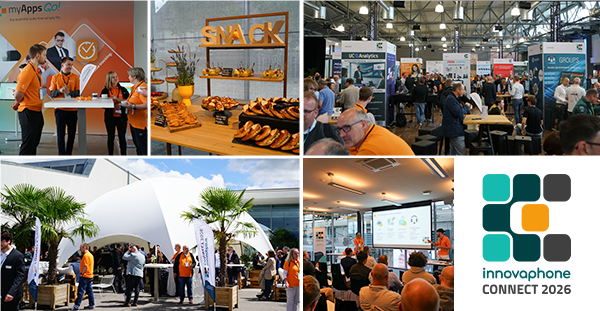
We are pleased to announce the 3rd edition of our innovaphone fair coming up next summer, so make sure to save the date:
innovaphone CONNECT 2026 June 11th, 2026
The fair’s motto is: "Connecting People. Creating Productivity."
Look forward to:
Exhibitor stands with plenty of ideas: Discover the latest solutions of our partners
innovaphone themed areas: Experience exciting communication & collaboration of tomorrow
Workshops & presentations: Gain practical insight & valuable know-how
Get-together in the evening: Enjoy the great atmosphere & network with others
Join us at our CONNECT 2026 and experience innovaphone myApps in all its colorful facets, connect with industry experts and gain new insight into the growing myApps ecosystem.
This website uses cookies to provide you with an optimal website experience. This includes cookies that are necessary for the operation of the website, as well as cookies that are only used for anonymous statistical purposes or for convenience settings to display special content. You can decide for yourself which settings you would like to allow. Please note that not all functionalities of the website might be available, depending on your settings. If you accept all cookies, you will have full access to all the services of our website. For further information, please read our privacy policy.